Showing posts with label Web Design and Development. Show all posts

Wednesday, May 8, 2019

RA21's recommended technical approach is broken by emerging browser privacy features


This is my third comment about the recently published NISO draft "Recommended Practice" (RP) on "Improved Access to Institutionally-Provided Information Resources" a. k. a. "Resource Access in the 21st Century" (RA21). Official comments can be submitted until May 17th.  My first comment concerned the use of secure communication channels. The second looked at potential phishing attacks on the proposed system. I'm posting the comments here so you can easily comment.

RA21's recommended technical approach is broken by emerging browser privacy features

Third party cookies are widely on the web used as trackers, or "web bugs", by advertising networks wishing to target users with advertising on the web. The impact of these trackers on privacy has been widely reported and decried. Browser local storage deployed using 3rd-party iframes is similarly employed for user tracking by ad networks. Browser vendors, led by Apple, have fought back against user tracking by providing user options to limit third party information sharing. Apple's "Intelligent Tracking Protection"  has progressively increased the barriers to cross-site information storage, for example, by partitioning the local storage according to third-party context.

Unfortunately for RA21, the draft recommended practice (RP) has endorsed a technical approach which mirrors the tactics used for user tracking by the advertising industry. For this reason, users of Safari who choose to enable the "prevent cross-site tracking" option may not benefit from the "seamless" access promised by RA21 if implemented with the endorsed technical approach.

Wikimedia commons
The optimistically acronymed "P3W" pilot used a javascript library called "Krakenjs/zoid" (According to the Norse sagas, the kraken is a squidlike monster that terrorizes voyagers) to exchange data between cross-domain contexts. The limitations on krakenjs in Safari are acknowledged by the library's developer.  It works by having the host webpage create an iframe loaded from a P3W website. With privacy controls off, the web page posts to the iframe, which answers with a reference to the user's identity provider. The service provider website uses that information to help the user authenticate without having to search through a huge list of identity providers. With Safari privacy features turned on, the search process must be repeated for each and every service provider domain.

Other browser vendors have moved towards restricting tracking behaviour. Firefox has announced that it will phase in "enhanced tracking protection"
Even Google's Chrome browser is moving towards restrictions on tracking technologies.

The bottom line is that if RA21 is implemented with the recommended technical approach, library users will probably be required to turn off privacy enhancing features of their browser software to use resources in their library. As a result, RA21 will have difficulty moving forward with community consensus on this technical approach.

Browser software is much more tolerant of cross-domain communication when the information "hub" is a first-party context (i.e. a window of its own, not an embedded iframe), as is done in more established authentication schemes such as OpenID Connect and SAML flow. RA21 should refocus its development effort on these technical approaches.

Update July 5, 2019:

RA21's official response to this comment is:
Future work includes storage policy notification. Also, we are not actually using third party cookies even though this term is often used to describe several cross-domain access patterns; instead, RA21 recommends using web storage (aka, browser local storage) together with HTML5 post-message for cross-domain access. This is the same mechanism (and indeed the same implementation) that PayPal uses, thus demonstrating broad browser support. A description of web storage has been added to the Terminology section. We are aware that by turning off "third party cookies" it is possible for the user to partly or completely disable the call to action button but in those cases the user experience degrades gracefully to a classical SAML/OpenIDC discovery flow.
Essentially the same response was made to three other submitted comments. Two of them, from Duke's Tim McGeary, called out two sections of the recommended practice and noted:
Word of caution: this login specifically cannot happen in an iFrame to meet SSO security protocol
The third, from Cornell University Library, submitted by Adam Chandler, amplified on McGeary:
Comment from Cornell University Library Privacy as a Service Working Group. Our group includes membership drawn from Library IT, Library Licensing, Library Public Services, Cornell IT Security, and Cornell Privacy Office.

Under 2.4.: We agree with Tim McGreary's comment (#862 or #863 - seems that he double-posted it) that the SSO login shouldn't be inside a frame on another page. There are security issues with that kind of approach. The users can't see the login page URL to verify that the page is a x.uni.edu page before entering their passwords, so it makes it easier to spoof the login page. Generally, login pages use "framebusting" to prevent this kind of possibility.
RA21's response on this issue is alarming, and suggests that the whole project is in danger of failure. RA21 seems to be unaware that using HTML5 web storage is worse than 3rd party cookies in many respects - particularly privacy and security. Currently, only Safari defaults to "a classical SAML/OpenIDC discovery flow", but that still means that if they want to be accurate, they'll have to rename the implementing organization "The Coalition for Seamless Access but Not on iOS" or "The Coalition for Problematic Access".

I hope that the beta implementation will be executed by a team with the experience and competence to override or at least effectively mitigate RA21's technical blunder.

Friday, May 4, 2018

Choose Privacy Week: Your Library Organization Is Watching You

Choose Privacy Week
T. J. Lamana and I have written a post for Choose Privacy Week. It's mirrored here, but be sure to check out all the great posts there.

Your Library Organization Is Watching You

We commonly hear that ‘Big Brother’ is watching you, in the context of digital and analog surveillance such as Facebook advertising, street cameras, E-Zpass highway tracking or content sniffing by internet service providers. But it’s not only Big Brother, there are a lot of “Little Brothers” as well, smaller less obvious that wittingly or unwittingly funnel data, including personal identifiable information (PII) to massive databases. Unfortunately libraries (and related organizations) are a part of this surveillance environment. In the following we’ll break down two example library organization websites. We’ll be focusing on two American Library Association (ALA) websites: ALA’s Office of Intellectual Freedom’s Choose Privacy Week website (ChoosePrivacyWeek.org) and ALA’s umbrella site (ala.org).

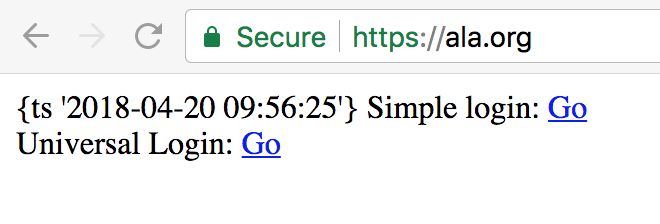
Before we dive too deeply, let’s review some basics about the data streams generated by a visit to a website. When you visit a website, your browser software - Chrome, Firefox, Safari, etc. - sends a request containing your IP address, the address of the webpage you want, and a whole bunch of other information. If the website supports “SSL”, most of that information is encrypted. If not, network providers are free to see everything sent or received. Without SSL, bad actors who share the networks can insert code or other content into the webpage you receive. The easiest way to see if a site has a valid SSL certificate is to look at the protocol identifier of a url. If it’s ‘HTTPS’, that traffic is encrypted, if it’s ‘HTTP’ DO NOT SEND any personally identifiable information (PII), as there is no guarantee that traffic is being protected. If you’re curious about the quality of a sites encryption, you can check its “Qualys report”, offered by SSL Labs., which checks the website’s configuration, and assigns a letter grade. ALA.org gets a B; ChoosePrivacyWeek gets a A. The good news is that even ALA.org’s B is an acceptable grade. The bad news is that the B grade is for “https://www.ala.org/”, whose response is reproduced here in its entirety:

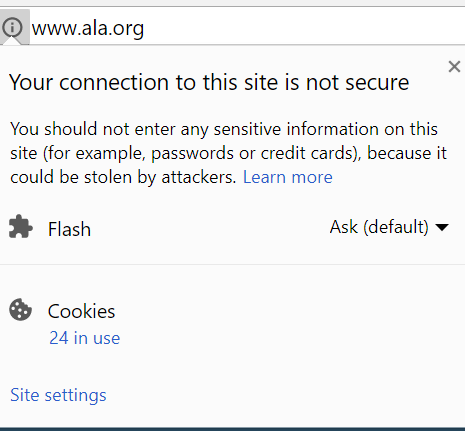
Unfortunately the ALA website is mostly available only without SSL encryption.

You don’t have to check the SSL Labs to see the difference. You can recognize ChoosePrivacyWeek.org as a “secure” connection by looking for the lock badge in your browser; click on that badge for more info. Here’s what the sites look like in Chrome:


Don’t assume that your privacy is protected just because a site has a lock badge, because the was is designed to spew data about you in many ways. Remember that “whole bunch of other information” we glossed over above? Included in that “other information” are “cookies” which allow web servers to keep track of your browsing session. It’s almost impossible to use the web these days without sending these cookies. But many websites include third party services that track your session as well. These are more insidious, because they give you an identifier that joins your activity across multiple websites. The combination of data from thousands of websites often gives away your identity, which then can be used in ways you have no control over.

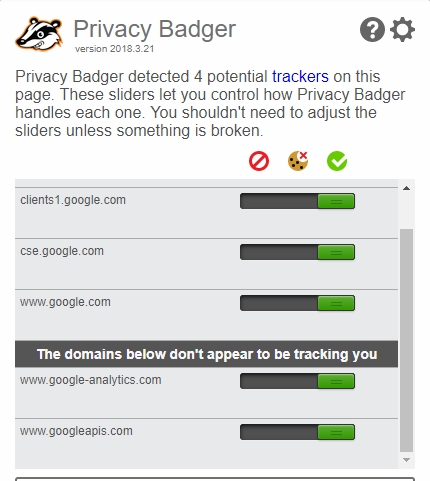
Privacy Badger is a browser extension created by the Electronic Frontier Foundation (EFF) which monitors the embedded code in websites that may be tracking your web traffic. You can see a side-by-side comparison of ALA.org on the left and ChoosePrivacyWeek on the right:
ALA.org
ChoosePrivacyWeek.org

The 2 potential trackers identified by Privacy Badger on ChoosePrivacyWeek are third party services: fonts from Google and an embedded video player from Vimeo. These are possibly tracking users, but are not optimized to do so. The 4 trackers on ALA.org merit a closer look. They’re all from Google; the ones of concern are placed by Google Analytics. One of us has written about how Google analytics can be configured to respect user privacy, if you trust Google’s assurances. To its credit, ALA.org has turned on the "anonymizeIP" setting, which in theory obscures user’s identity. But it also has “demographics” turned on, which causes an advertising (cross-domain) cookie to be set for users of ALA.org, and Google’s advertising arm is free to use ALA.org user data to target advertising (which is how Google makes money). PrivacyBadger allows you to disable any or all of these trackers and potential trackers (though doing so can break some websites).

Apart from giving data to third parties, any organization has to have internal policies and protocols for handling the reams of data generated by website users. It’s easy to forget that server logs may be grow to contain hundreds of gigabytes or more of data that can be traced back to individual users. We asked ALA about their log retention policies with privacy in mind. ALA was kind enough to respond:
“We always support privacy, so internal meetings are occurring to determine how to make sure that we comply with all applicable laws while always protecting member/customer data from exposure. Currently, ALA is taking a serious look at collection and retention in light of the General Data Protection Regulation (GDPR) EU 2016/679, a European Union law on data protection and privacy for all individuals within the EU. It applies to all sites/businesses that collect personal data regardless of location.”
Reading in between the lines, it sounds like ALA does not yet have log retention policies or protocols. It’s encouraging that these items are on the agenda, but disappointing that it’s 2018 and these items are on the agenda. ALA.org has a 4 year old privacy policy on its website that talks about the data it collects, but has no mention of a retention policy, or of third party service use.

The ChoosePrivacyWeek website has a privacy statement that’s more emphatic:
We will collect no personal information about you when you visit our website unless you choose to provide that information to us.
The lack of tracking on the site is aligned with this statement, but we’d still like to see a statement about log retention. ChoosePrivacyWeek is hosted on a DreamHost WordPress server, and usage log files at Dreamhost were recently sought by the Department of Justice in the Disruptj20.org case.

Organizations express their priorities and values in their actions. ALA’s stance toward implementing HTTPS will be familiar to many librarians; limited IT resources get deployed according competing priorities. In the case of ALA, a sorely needed website redesign was deemed more important to the organization than providing incremental security and privacy to website users by implementing HTTPS. Similarly, the demographic information provided by Google’s advertising tracker was valued more than member privacy (assuming ALA is aware of the trade-off). The ChoosePrivacyWeek.org website has a different set of values and objectives, and thus has made some different choices.

In implementing their websites and services, libraries make many choices that impact on user privacy. We want librarians, library administrators, library technology staff and library vendors to be aware of the choices they are making, and aware of the values they are expressing on behalf of an organization or of a library. We hope that they will CHOOSE PRIVACY.

Sunday, October 29, 2017

Turning the page on ereader pagination

Why bother paginating an ebook? Modern websites encourage you to "keep on swiping" but if you talk to people who read ebooks, they rather like pages. I'll classify their reasons into "backward looking" and "practical".

Backward looking reasons that readers like pagination
  • pages evoke the experience of print books
  • a tap to turn a page is easier than swiping
Practical reasons that readers like pagination
  • pages divide reading into easier to deal with chunks
  • turning the page gives you a feeling of achievement
  • the thickness of the turned pages help the reader measure progress
Reasons that pagination sucks
  • sentences are chopped in half
  • paragraphs are chopped in half
  • figures and such are sundered from their context
  • footnotes are ... OMG footnotes!
How would you design a long-form reading experience for computer screens if you weren't tied to pagination? Despite the entrenchment of Amazon and iPhones, people haven't stopped taking fresh looks at the reading experience.

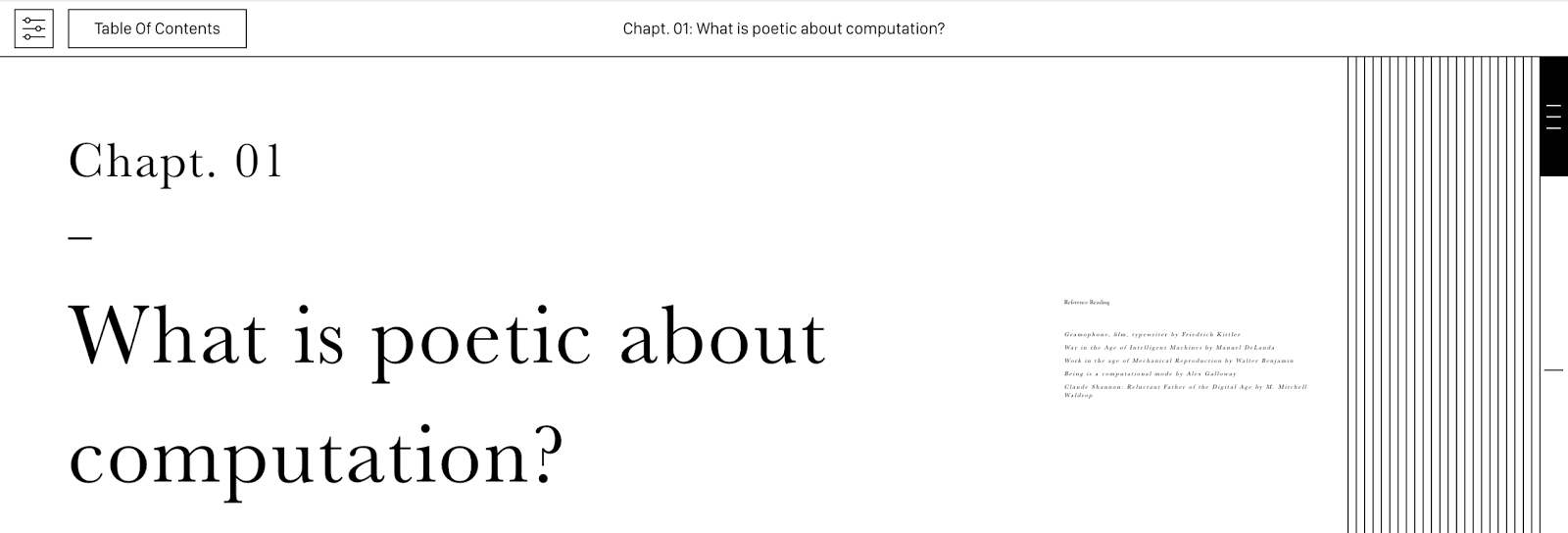
Taeyoon Choi and his collaborators at the School for Poetic Computation recently unveiled their "artistic intervention" into the experience of reading. (Choi and a partner founded the Manhattan-based school in 2013 to help artists learn and apply technology.) You can try it out at http://poeticcomputation.info/


On viewing the first chapter, you immediately see two visual cues that some artistry is afoot. On the right side, you see something that looks like a stack of pages. On the left is some conventional-looking text, and to its right is a some shrunken text. Click on the shrunken text to expand references for the now shrunken main text. This conception of long form text as existing in two streams seems much more elegant than the usual pop-up presentation of references and footnotes in ebook readers. Illustrations appear in both streams, and when you swipe one stream up or down, the other stream moves with it.

The experience of the poetic computation reader on a smartphone adapts to the smaller screen. One or other of the two streams is always off-screen, and little arrows, rather than shrunken images indicate the other's existence.

 * * *

On larger screens, something very odd happens when you swipe down a bit. You get to the end of the "page". And then it starts moving the WRONG way, sideways instead of up and down. Keep swiping, and you've advanced the page! The first time this happened, I found it really annoying. But then, it started to make sense. "Pages" in the Poetic Computation Reader are intentional, not random breaks imposed by the size of the readers screen and the selected typeface. The reader gets a sense of achievement, along with an indication of progress.

In retrospect, this is a completely obvious thing to do. In fact, authors have been inserting intentional breaks into books since forever. Typesetters call these breaks "asterisms" after the asterisks that are used to denote them. They look rather stupid in conventional ebooks. Turning asterisms into text-breaking animations is a really good idea. Go forth and implement them, ye ebook-folx!

On a smart phone, Poetic Computation Reader ignores the "page breaks" and omits the page edges. Perhaps a zoom animation and a thickened border would work.

Also, check out the super-slider on the right edge. Try to resist sliding it up and down a couple of times. You can't!

 * * *

Another interesting take on the reading experience is provided by Slate, the documentation software written by Robert Lord. On a desktop browser, Slate also presents text in parallel streams. The center stream can be thought of as the main text. On the left is the hierarchical outline (i.e. a table of contents), on the right is example code. I like the way you can scroll either the outline or the text stream and the other stream follows. The outline expands and contracts accordion-style as you scroll, resulting in effortless navigation. But Slate uses a responsive design framework, so on a smartphone, the side streams reconfigure into inline figures or slide-aways.

"Clojure by Example", generated by Slate.

There are no "pages" in Slate. Instead, the animated outline is always aware of where you are and indicates your progress. The outline is a small improvement on the static outline produced by documentation generators like Sphinx, but the difference in navigability and usability is huge.

As standardization and corporate hegemony seem to be ossifying digital reading experiences elsewhere,  independent experiments and projects like these give me hope that a next generation of ebooks will put some new wind in the sails of our digital reading journey.

Notes:
  1. The collaborators on the Poetic Computation Reader include Molly Kleiman, Shannon Mattern, Taeyoon Choi and HAWRAF. Also, these footnotes are awkward.


Thursday, February 2, 2017

How to enable/disable privacy protection in Google Analytics (it's easy to get wrong!)

In my survey last year of ARL library web services, I found that 72% of them used Google Analytics. So it's not surprising that a common response to my article about leaking catalog searches to Amazon was to wonder whether the same thing is happening with Google Analytics.

The short answer is "It Depends". It might be OK to use Google Analytics on a library search facility, if the following things are true:
  1. The library trusts Google on user privacy. (Many do.)
  2. Google is acting in good faith to protect user privacy and is not acting under legal compulsion to act otherwise. (We don't really know.)
  3. Google Analytics is correctly doing what their documentation says they are doing and not being circumvented by the rest of Google. (They don't always.)
  4. The library has implemented Google Analytics correctly to enable user privacy.
There's an entire blog post to write about each of the first three conditions, but I have only so many hours in a day.  Given that many libraries have decided that the benefits using of Google Analytics outweigh the privacy risks, the rest of this post concerns only this last condition. Of the 72% of ARL libraries that use Google Analytics, I find that only 19% of them have implemented Google Analytics with privacy-protection features enabled.

So, if you care about library privacy but can't do without Google Analytics, read on!

Google Analytics has a lot of configuration options, which is why webmasters love it. For the purposes of user privacy, however, there are just two configuration options to pay attention to, the "IP Anonymization" option and the "Display Features" option.

IP Anonymization says to Google Analytics "please don't remember the exact IP address of my users". According to Google, enabling this mode masks the least significant bits of the user's IP address before the IP address is used or saved. Since many users can be identified by their IP address, this prevents anyone from discovering the search history for a given IP address. But remember, Google is still sent the IP address, and we have to trust that Google will obscure the IP address as advertised, and not save it in some log somewhere. Even with the masked IP address, it may still be possible to identify a user, particularly if a library serves a small number of geographically dispersed users.

"Display Features" says to Google to that you don't care about user privacy, and it's OK to track your users all to hell so that you can get access to "demographic" information. To understand what's happening, it's important to understand the difference between "first-party" and "third-party" cookies, and how they implicate privacy differently.

Out of the box, Google Analytics uses "first party" cookies to track users. So if you deploy Google Analytics on your "library.example.edu" server, the tracking cookie will be attached to the library.example.edu hostname. Google Analytics will have considerable difficulty connecting user number 1234 on the library.example.edu domain with user number 5678 on the "sci-hub.info" domain, because the user ids are chosen randomly for each hostname. But if you turn on Display Features, Google will connect the two user ids via a third party tracking cookie from its Doubleclick advertising service. This enables both you and Google to know more about your users. Anyone with access to Google's data will be able to connect the catalog searches saved for user number 1234 to that user's searches on any website that uses Google advertising or any site that has Display Features turned on.

IP Anonymization and Display Features can be configured in Google Analytics in three ways, depending on how it's being configured. The instructions here apply to the "Universal Analytics" script. You can tell a site uses Universal Analytics because the pages execute a javascript named "analytics.js". An older "classic" version of Google Analytics uses a script named "ga.js"; its configuration is similar to that of Universal. More complex websites may use Google Tag Manager to deploy and configure Google Analytics.

Google Analytics is usually deployed on a web page by inserting a script element that looks like this:
<script>
    (function(i,s,o,g,r,a,m){i['GoogleAnalyticsObject']=r;i[r]=i[r]||function(){
    (i[r].q=i[r].q||[]).push(arguments)},i[r].l=1*new Date();a=s.createElement(o),
    m=s.getElementsByTagName(o)[0];a.async=1;a.src=g;m.parentNode.insertBefore(a,m)
    })(window,document,'script','https://www.google-analytics.com/analytics.js','ga');
    ga('create', 'UA-XXXXX-Y', 'auto');
    ga('send', 'pageview');
</script>
IP Anonymization and Display Features are turned on with extra lines in the script:
    ga('create', 'UA-XXXXX-Y', 'auto');
    ga('require', 'displayfeatures');  // starts tracking users across sites
    ga('set', 'anonymizeIp', true); // makes it harder to identify the user from logs
    ga('send', 'pageview');
The Google Analytics Admin allows you to turn on cross site user tracking, though the privacy impact of what you're doing is not made clear . In the "Data Collection" item of the Tracking info pane, look at the toggle switches for "Remarketing" and "Advertising Reporting Features" if these are switched to "ON", then you've enabled cross site tracking and your users can expect no privacy.

Turning on IP anonymization is not quite as easy and turning on cross-site tracking. You have to add it explicitly in your script or turn it on in Google tag manager (where you won't find it unless you know what to look for!).

To check if cross-site tracking has been turned on in your institution's Google Analytics, use the procedures I described in my article on How to check if your library is leaking catalog searches to Amazon.  First, clear the cookies for your website, then load your site and look at the "Sources" tab in Chrome developer tools. If there's a resource from "stats.g.doubleclick.net", then your website is asking google to track your users across sites. If your institution is a library, you should not be telling Google to track your users across sites.

Bottom line: if you use Google Analytics, always remember that Google is fundamentally an advertising company and it will seldom guide you towards protecting your users' privacy.

Friday, January 13, 2017

Google's "Crypto-Cookies" are tracking Chrome users

Ordinary HTTP cookies are used in many ways to make the internet work. Cookies help websites remember their users. A common use of cookies is for authentication: when you log into a website, the reason you stay logged is because of a cookie that contains your authentication info. Every request you make to the website includes this cookie; the website then knows to grant you access.

But there's a problem: someone might steal your cookies and hijack your login. This is particularly easy for thieves if your communication with the website isn't encrypted with HTTPS. To address the risk of cookie theft, the security engineers of the internet have been working on ways to protect these cookies with strong encryption. In this article, I'll call these "crypto-cookies", a term not used by the folks developing them. The Chrome user interface calls them Channel IDs.


Development of secure "crypto-cookies" has not been a straight path. A first approach, called "Origin Bound Certificates" has been abandoned. A second approach "TLS Channel IDs" has been implemented, then superseded by a third approach, "TLS Token Binding" (nicknamed "TokBind"). If you use the Chrome web browser, your connections to Google web services take advantage of TokBind for most, if not all, Google services.

This is excellent for security, but might not be so good for privacy; 3rd party content is the culprit. It turns out that Google has not limited crypto-cookie deployment to services like GMail and Youtube that have log-ins. Google hosts many popular utilities that don't get tracked by conventional cookies. Font libraries such as Google Fonts, javascript libraries such as jQuery, and app frameworks such as Angular, are all hosted on Google servers. Many websites load these resources from Google for convenience and fast load times.  In addition, Google utility scripts such as Analytics and Tag Manager are delivered from separate domains so that users are only tracked across websites if so configured.  But with Google Chrome (and Microsoft's Edge Browser), every user that visits any website using Google Analytics, Google Tag Manager, Google Fonts, JQuery, Angular, etc. are subject to tracking across websites by Google. According to Princeton's OpenWMP project, more than half of all websites embed content hosted on Google servers.
Top 3rd-party content hosts. From Princeton's OpenWMP.
Note that most of the hosts labeled "Non-Tracking Content"
are at this time subject to "crypto-cookie" tracking.


While using 3rd party content hosted by Google was always problematic for privacy-sensitive sites, the impact on privacy was blunted by two factors – cacheing and statelessness. If a website loads fonts from fonts.gstatic.com, or style files from fonts.googleapis.com, the files are cached by the browser and only loaded once per day. Before the rollout of crypto-cookies, Google had no way to connect one request for a font file with the next – the request was stateless; the domains never set cookies. In fact, Google says:
Use of Google Fonts is unauthenticated. No cookies are sent by website visitors to the Google Fonts API. Requests to the Google Fonts API are made to resource-specific domains, such as fonts.googleapis.com or fonts.gstatic.com, so that your requests for fonts are separate from and do not contain any credentials you send to google.com while using other Google services that are authenticated, such as Gmail. 
But if you use Chrome, your requests for these font files are no longer stateless. Google can follow you from one website to the next, without using conventional tracking cookies.

There's worse. Crypto-cookies aren't yet recognized by privacy plugins like Privacy Badger, so you can be tracked even though you're trying not to be. The TokBind RFC also includes a feature called "Referred Token Binding" which is meant to allow federated authentication (so you can sign into one site and be recognized by another). In the hands of the advertising industry, this will get used for sharing of the crypto-cookie across domains.

To be fair, there's nothing in the crypto-cookie technology itself that makes the privacy situation any different from the status quo. But as the tracking mechanism moves into the web security layer, control of tracking is moved away from application layers. It's entirely possible that the parts of Google running services like gstatic.com and googleapis.com have not realized that their infrastructure has started tracking users. If so, we'll eventually see the tracking turned off.  It's also possible that this is all part of Google's evil master plan for better advertising, but I'm guessing it's just a deployment mistake.

So far, not many companies have deployed crypto-cookie technology on the server-side. In addition to Google and Microsoft, I find a few advertising companies that are using it.  Chrome and Edge are the only client side implementations I know of.

For now, web developers who are concerned about user privacy can no longer ignore the risks of embedding third party content. Web users concerned about being tracked might want to use Firefox for a while.

Notes:

  1. This blog is hosted on a Google service, so assume you're being watched. Hi Google!
  2. OS X Chrome saves the crypto-cookies in an SQLite file at "~/Library/Application Support/Google/Chrome/Default/Origin Bound Certs". 
  3. I've filed bug reports/issues for Google Fonts, Google Chrome, and Privacy Badger. 
  4. Dirk Balfanz, one of the engineers behind TokBind has a really good website that explains the ins and outs of what I call crypto-cookies.
  5. (added 12/29/2018) It seems that Chrome will be removing support for Token Binding.


Thursday, December 22, 2016

How to check if your library is leaking catalog searches to Amazon

I've been writing about privacy in libraries for a while now, and I get a bit down sometimes because progress is so slow. I've come to realize that part of the problem is that the issues are sometimes really complex and  technical; people just don't believe that the web works the way it does, violating user privacy at every opportunity.

Content embedded in websites is a a huge source of privacy leakage in library services. Cover images can be particularly problematic. I've written before that, without meaning to, many libraries send data to Amazon about the books a user is searching for; cover images are almost always the culprit. I've been reporting this issue to the library automation companies that enable this, but a year and a half later, nothing has changed. (I understand that "discovery" services such as Primo/Summon even include config checkboxes that make this easy to do; the companies say this is what their customers want.)

Two indications that a third-party cover image is a privacy problem are:
  1. the provider sets tracking cookies on the hostname serving the content.
  2. the provider collects personal information, for example as part of commerce. 
For example, covers served by Amazon send a bonanza of actionable intelligence to Amazon.

Here's how to tell if your library is sending Amazon your library search data.

Setup

You'll need a web browser equipped with developer tools; I use Chrome. Firefox should work, too.

Log into Amazon.com. They will give you a tracking cookie that identifies you. If you buy something, they'll have your credit card number, your physical and electronic addresses, records about the stuff you buy, and a big chunk of your web browsing history on websites that offer affiliate linking. These cookies are used to optimize the advertisements you're shown around the web.

To see your Amazon cookies, go to Preferences > Settings. Click "Show advanced setting..." (It's hiding at the bottom.)

Click the  "Content settings.." button.

Now click the "All cookies and site data" button.

in the "Search cookies" box, type "amazon". Chances are, you'll see something like this.

I've got 65 cookies for "amazon.com"!

If you remove all the cookies and then go back to Amazon, you'll get 15 fresh cookies, most of them set to last for 20 years. Amazon knows who I am even if a delete all the cookies except "x-main".

Test the Library

Now it's time to find a library search box. For demonstration purposes, I'll use Harvard's "Hollis" catalog. I would get similar results at 36 different ARL libraries, but Harvard has lots of books and returns plenty of results. In the past, I've used What to expect as my search string, but just to make a point, I'll use Killing Trump, a book that Bill O'Reilly hasn't written yet.

Once you've executed your search, choose View > Developer > Developer Tools

Click on the "Sources" tab and to see the requests made of "images.amazon.com". Amazon has returned 1x1 clear pixels for three requested covers. The covers are requested by ISBN. But that's not all the information contained in the cover request.

To see the cover request, click on the "Network" tab and hit reload. You can see that the cover images were requested by a javascript called "primo_library_web" (Hollis is an instance of Ex Libris' Primo discovery service.)

Now click on the request you're interested in. Look at the request headers.


There are two of interest, the "Cookie" and the "Referer".

The "Cookie" sent to Amazon is this:
x-main="oO@WgrX2LoaTFJeRfVIWNu1Hx?a1Mt0s";
skin=noskin; session-token="bcgYhb7dksVolyQIRy4abz1kCvlXoYGNUM5gZe9z4pV75B53o/4Bs6cv1Plr4INdSFTkEPBV1pm74vGkGGd0HHLb9cMvu9bp3qekVLaboQtTr+gtC90lOFvJwXDM4Fpqi6bEbmv3lCqYC5FDhDKZQp1v8DlYr8ZdJJBP5lwEu2a+OSXbJhfVFnb3860I1i3DWntYyU1ip0s="; x-wl-uid=1OgIBsslBlOoArUsYcVdZ0IESKFUYR0iZ3fLcjTXQ1PyTMaFdjy6gB9uaILvMGaN9I+mRtJmbSFwNKfMRJWX7jg==; ubid-main=156-1472903-4100903;
session-id-time=2082787201l;
session-id=161-0692439-8899146
Note that Amazon can tell who I am from the x-main cookie alone. In the privacy biz, this is known as "PII" or personally identifiable information.

The "Referer" sent to Amazon is this:
http://hollis.harvard.edu/primo_library/libweb/action/search.do?fn=search&ct=search&initialSearch=true&mode=Basic&tab=everything&indx=1&dum=true&srt=rank&vid=HVD&frbg=&tb=t&vl%28freeText0%29=killing+trump&scp.scps=scope%3A%28HVD_FGDC%29%2Cscope%3A%28HVD%29%2Cscope%3A%28HVD_VIA%29%2Cprimo_central_multiple_fe&vl%28394521272UI1%29=all_items&vl%281UI0%29=contains&vl%2851615747UI0%29=any&vl%2851615747UI0%29=title&vl%2851615747UI0%29=any
To put this plainly, my entire search session, including my search string killing trump is sent to Amazon, alongside my personal information, whether I like it or not. I don't know what Amazon does with this information. I assume if a government actor wants my search history, they will get it from Amazon without much fuss.

I don't like it.

Rant

[I wrote a rant; but I decided to save it for a future post if needed.] Anyone want a Cookie?

Notes 12/23/2016:


  1. As Keith Jenkins noted, users can configure Chrome and Safari to block 3rd Party cookies. Firefox won't block Amazon cookies, however. And some libraries advise users to not to block 3rd party cookies because doing so can cause problems with proxy authentication.
  2. If Chrome's network panel tells you "Provisional headers are shown" this means it doesn't know what request headers were really sent because another plugin is modifying headers. So if you have HTTPS Everywhere, Ghostery, Adblock, or Privacy Badger installed, you may not be able to use Chrome developer tools to see request headers. Thanks to Scott Carlson for the heads up.
  3. Cover images from Google leak similar data; as does use of Google Analytics. As do Facebook Like buttons. Et cetera.
  4. Thanks to Sarah Houghton for suggesting that I write this up.

Update 3/23/2017:

There's good news in the comments!

Wednesday, September 7, 2016

Start Saying Goodbye to eBook Pagination

Book pages may be the most unfortunate things ever invented by the reading-industrial complex. No one knows the who or how of their invention. The Egyptians and the Chinese didn't need pages because they sensibly wrote in vertical lines. It must have been the Greeks who invented and refined the page.
Egyptian scroll held in the UNE Antiquities Museum
CC BY 
unephotos
In my imagination, some scribes invented the page in a dark and damp scriptorium after arguing about landscape versus portrait on their medieval iScrolls. They didn't worry about user experience. The debate must have been ergonomics versus cognitive load. Opening the scroll side-to-side allowed the monk to rest comfortably when the scribing got boring, and the addition brainwork of figuring out how to start a new column was probably a great relief from monotony. That and drop-caps. The codex probably came about when the scribes ran out of white-out.
Scroll of the Book of EstherSevilleSpain
Technical debt from this bad decision lingers. Consider the the horrors engendered by pagination:
  • We have to break pages in the middle of sentences?!?!?!? Those exasperating friends of yours who stop their sentences in mid-air due to lack of interest or memory probably work as professional paginators. 
  • When our pagination leaves just one line of a paragraph at the top of a page, you have what's known as a widow. Pagination is sexist as well as exasperating.
  • Don't you hate it when a wide table is printed sideways? Any engineer can see this is a kludgy result of choosing the wrong paper size.
To be fair, having pages is sometimes advantageous.
  • You can put numbers on the pages. This allows an entire class of students to turn to the same page. It also allows textbook companies to force students to buy the most recent edition of their exorbitantly priced textbooks. The ease of shifting page numbers spares the textbook company of the huge expense of making actual revisions to the text.
  • Pages have corners, convenient for folding.
  • You can tell often-read pages in a book by looking for finger-grease accumulation on the page-edges. I really hope that stuff is just finger-grease.
  • You can rip out important pages. Because you can't keep a library book forever.
  • Without pages in books, how would you press flowers?
  • With some careful bending, you can make a cute heart shape.
Definition of love by Billy Rowlinson, on Flickr; CC-BY 

While putting toes in the water of our ebook future, we still cling to pages like Linus and his blankie. At first, this was useful. Users who had never seen an ebook could guess how they worked. Early e-ink based e-reading devices had great contrast and readability but slow refresh rates. "Turning" a page was giant hack that turned a technical liability of slow refresh into a whizzy dissolve feature. Apple's iBooks app for the iPad appeared at the zenith of skeuomorphic UI design fashion and its too-cute page-turn animation is probably why the DOJ took Apple to court. (Anti-trust?? give me a break!)

But seriously, automated pagination is hard. I remember my first adventures with TEΧ, in the late '80s, half my time was spent wrestling with unfortunate, inexplicable pagination and equation bounding boxes. (Other half spent being mesmerized at seeing my own words in typeset glory.)

The thing that started me on this rant is the recent publication of the draft EPUB 3.1 specification, which has nothing wrong with it but makes me sad anyway. It's sad because the vast majority of ebook lovers will never be able to take advantage of all the good things in it. And it's not just because of Amazon and its Kindle propriety. It's the tug of war between the page-oriented past of books and the web-oriented future of ebooks. EPUB's role is to leverage web standards while preserving the publishing industry's investment in print-compatible text. Mission accomplished, as much as you can expect.

What has not been part of EPUB's mission is to leverage the web's amazingly rapid innovation in user interfaces. EPUB is essentially a website packaged into a compressed archive. But over the last eight years, innovations in "responsive" web reading UI, driven by the need of websites to work on both desktop and mobile devices, have been magical. Tap, scroll and swipe are now universally understood and websites that don't work that way seem buggy or weird. Websites adjust to your screen size and orientation. They're pretty easy to implement, because of javascript/css frameworks such as Bootstrap and Foundation. They're perfect for ebooks, except... the affordances provided by these responsive design frameworks conflict with the built-in affordances of ebook readers (such as pagination). The result has been that, from the UI point of view,  EPUBs are zipped up turn-of-the-century websites with added pagination.

Which is what makes me sad. Responsive, touch-based web designs, not container-paginated EPUBs, are the future of ebooks. The first step (which Apple took two years ago) is to stop resisting the scroll, and start saying goodbye to pagination.

Wednesday, June 22, 2016

Wiley's Fake Journal of Constructive Metaphysics and the War on Automated Downloading


Suppose you were a publisher and you wanted to get the goods on a pirate who was downloading your subscription content and giving it away for free. One thing you could try is to trick the pirate into downloading fake content loaded with spy software and encoded information about how the downloading was being done. Then you could verify when the fake content was turning up on the pirate's website.

This is not an original idea. Back in the glory days of Napster, record companies would try to fill the site with bad files which somehow became infested with malware. Peer-to-peer networks evolved trust mechanisms to foil bad-file strategies.

I had hoped that the emergence of Sci-Hub as an efficient, though unlawful, distributor of scientific articles would not provoke scientific publishers to do things that could tarnish the reputation of their journals. I had hoped that publishers would get their acts together and implement secure websites so that they could be sure that articles were getting to their real subscribers. Silly me.

In series of tweets, Rik Smith-Unna noted with dismay that the Wiley Online Library was using "fake DOIs" as "trap URLs", URLs in links invisible to human users. A poorly written web spider or crawler would try to follow the link, triggering a revocation of the user's access privileges. (For not obeying the website's terms of service, I suppose.)

Gabriel J. Gardner of Cal State Long Beach has reported his library's receipt of a scary email from Wiley stating:
Wiley has been investigating activity that uses compromised user credentials from institutions to access proxy servers like EZProxy (or, in some cases, other types of proxy) to then access IP-authenticated content from the Wiley Online Library (and other material). We have identified a compromised proxy at your institution as evidenced by the log file below. 
We will need to restrict your institution’s proxy access to Wiley Online Library if we do not receive confirmation that this has been remedied within the next 24 hours.  

I've been seeing these trap urls in scholarly journals for almost 20 years now. Two years ago they reappeared in ACS journals. They're rarely well thought out, and from talking with publishers who have tried them, they don't work as intended. The Wiley trap URLs exhibit several mistakes in implementation.
  1. Spider trap URLs are are useful for detecting bots that ignore robot exclusions. But Wiley's robots.txt document doesn't exclude the trap urls, so "well-behaved" spiders, such as googlebot are also caught. As a result, the fake Wiley page is indexed in Google, and because of the way Google aggregates the weight of links, it's actually a rather highly ranked page
  2. The download urls for the fake article don't download anything, but instead return a 500 error code whenever an invalid pseudo-DOI is presented to the site. This is a site misconfiguration that can cause problems with link checking or link verification software.
  3. Because the fake URLs look like Wiley DOI's, they could cause confusion if circulated. Crossref discourages this.
  4. The trap URLs as implemented by Wiley can be used for malicious attacks. With a list of trap URLs, it's trivial to craft an email or a web page that causes the user to request the full list of trap URLs. When the trap URLs trigger service suspensions this gives you the ability to trigger a suspension by sending the target an email.
  5. Apparently, Wiley used a special cookie to block the downloading. Have they not heard of sessions?
  6. The blocks affected both subscription and open-access content. Umm, do I need to explain the concept of "Open Access"?
  7. It's just not a smart idea (Even on April Fools!) for a reputable publisher to create fake article pages for "Constructive Metaphysics in Theories of Continental Drift. (warning: until Wiley realizes their ineptness, this link may trigger unexpected behavior. Use Tor.) It's an insult to both geophysicists and philosophers. And how does the University of Bradford feel about hosting a fictitious Department of Geophysics???


Instead of trap urls, online businesses that need to detect automated activity have developed elaborate and effective mechanisms to do so. Automated downloads are a billion dollar problem for the advertising industry in particular. So advertisers, advertising networks, and market research companies use coded, downloaded javascripts and flash scripts to track and monitor both users and bots. I've written about how these practices are inappropriate in library contexts. In comparison, the trap URLs being deployed by Wiley are sophomoric and a technical embarrassment.

If you visit the Wiley fake article page now, you won't get an article. You get a full dose of monitoring software. Wiley uses a service called Qualtrics Site Intercept to send you "Creatives" if you meet targeting criteria. But you'll also get that if you access Wiley's Online Library's real articles, along with sophisticated trackers from Krux Digital, Grapeshot, Jivox, Omniture, Tradedesk, Videology and Neustar.

Here's the letter I'd like libraries to start sending publishers:
[Library] has been investigating activity that causes spyware from advertising networks to compromise the privacy of IP-authenticated users of the [Publisher] Online Library, a service for we have been billed [$XXX,XXX]. We have identified numerous third party tracking beacons and monitoring scripts infesting your service as evidenced by the log file below. 
We will need to restrict [Publisher]'s access to our payment processes if we do not receive confirmation that this has been remedied within the next 24 hours.  
Notes:
  1. Here's another example of Wiley cutting off access because of fake URL clicking. The implication that Wiley has stopped using trap URLs seems to be false.
  2. Some people have suggested that the "fake DOIs" are damaging the DOI system. Don't worry, they're not real DOI's and have not been registered. The DOI system is robust against this sort of thing; it's still disrespectful.
Update June 23:
  1. Tom Griffin, a spokesman for Wiley, has posted a denial to LIBLICENCE which has a tenuous grip on reality.
  2. Smith-Unna has posted a point-by-point response to Griffin's denial in the form of a gist . 

Saturday, January 2, 2016

The Best eBook of 2015: "What is Code?"

When the Compact Disc was being standardized, its capacity was set to accommodate the length of Beethoven's Ninth Symphony, reportedly at the insistence of Sony executive Norio Ohga. In retrospect it seems obvious that a media technology should adapt to media art wherever possible, not vice versa. This is less possible when new media technologies enable new forms of creation, but that's what makes them so exciting.

I've been working primarily on ebooks for the past 5 years, mostly because I'm excited at the new possibilities they enable. I'm impressed - and excited -  when ebooks do things that can't be done for print books, partly because ebooks often can't capture the most innovative uses of ink on paper.

Looking back on 2015, there was one ebook more than any other that demonstrated the possibilities of the ebook as an art form, while at the same time being fun, captivating, and awe-inspiring, Paul Ford's What Is Code?

Unfortunately, today's ebook technology standards can't fully accommodate this work. The compact disc of ebooks can store only four and a half movements of Beethoven's Ninth. That makes me sad.

You might ask, how does What Is Code? qualify as an ebook if it doesn't quite work on a kindle or your favorite ebook app? What Is Code? was conceived and developed as an HTML5 web application for Business Week magazine, not with the idea of making an ebook. Nonetheless, What Is Code? uses the forms and structures of traditional books. It has a title page. It has chapters, sections, footnotes and a table of contents which support a linear narrative. It has marginal notes, figures and asides.

Despite its bookishness, it's hard to imagine What Is Code? in print. Although the share buttons and video embeds are mostly adornments for the text, activity modules are core to the book's exposition. The book is about code, and by bringing code to life, the reader becomes immersed in the book's subject matter. There's a greeter robot that waves and seems to know the reader, showing the ebook's "intelligence". The "how do you type an "A" activity in section 2.1 is a script worth a thousand words  and the "mousemove" activity in section 6.2 is a revelation even to an experienced programmer. If all that weren't enough, there's a random, active background that manages to soothe more than it distracts.

Even with its digital doodads, What Is Code? can be completely self contained and portable. To demonstrate this, I've packaged it up and archived it at Internet Archive; you can download with this link (21MB).  Once you've downloaded it, unzip it and load the "index.html" file into a modern browser. Everything will work fine, even if you turn off your internet connection. What Is Code? will continue to work after Business Week disappears from the internet (or behind the most censorious firewall). [1]

I was curious how much of What is Code? could be captured in a standard EPUB ebook file. I first tried making a EPUB version 2 file with Calibre. The result was not a lame as I thought it would be, but stripped of interactivity, it seemed like a photocopy of a sticker book - the story's there, but the fun, not so much. Same with the Kindle version .

I hoped that more of the scripts would work with an EPUB 3 file. This is more or the same as the zipped html file I made but I was unable to get it to display properly in iBooks despite 2 days of trying. Perhaps someone more experienced with javascript in EPUB3 could manage it. The display in Calibre was a bit better. Readium, the flagship software for EPUB3, just sat there spinning a cursor. It seems that the scripts handling the vertical swipe convention of the web conflict with the more bookish pagination attempted by iBooks.

The stand-alone HTML zip archive that I made addresses most of the use cases behind EPUB. The text is reflowable and user-adjustable. Elements adjust nicely to the size of the screen from laptop to smartphone. The javascript table of contents works the same as in an ebook reader. Accessibility could be improved, but that's mostly a matter of following accessibility standards that aren't specific to ebooks.

My experimentation with the code behind What Is Code? is another exciting aspect of making books into ebooks. Code and digital text can use a open licenses [2] that permit others to use, re-use and learn from What Is Code?. The entire project archive is hosted on GitHub and to date has been enhanced 671 times by 29 different contributors. There have been 187 forks (like mine) of the project. I think this collaborative creation process will be second nature to the ebook of the future.

There have been a number of proposals for portable HTML5 web archive formats for ebook technology moving forward. Among these are "5DOC"  and W3C's "Portable Web Platform".   As far as I can tell, these proposals aren't getting much traction or developer support. To succeed, the format has to be very lightweight and useful, or be supported by at least 2 of Amazon, Apple, and Google. I hope someone succeeds at this.

Whatever happens I hope there's room for Easter Eggs in the future of the ebook. There's a "secret" keyboard combination that triggers a laugh-out-loud Easter Egg on What is Code? And if you know how to look at What Is Code?'s javascript console, you'll see a message that's an appropriate ending for this post:


Best of 2015, don't you agree?

[1] To get everything in What Is Code? to work without an internet connection, I needed to add a small number of remotely loaded resources and fix a few small javascript bugs specific to loading from a file. (If you must know, pushing to the document.history of a file isn't allowed.) The YouTube embed is blank, of course, and a horrible, gratuitous Flash widget needed to be excised. You can see the details on GitHub.

[2] In this case, the Apache License and the Creative Commons By-NC-ND License.

Tuesday, December 22, 2015

xISBN: RIP


When I joined OCLC in 2006 (via acquisition), one thing I was excited about was the opportunity to make innovative uses of OCLC's vast bibliographic database. And there was an existence proof that this could be done, it was a neat little API that had been prototyped in OCLC's Office of Research: xISBN.

xISBN was an example of a microservice- it offered a small piece of functionality and it did it very fast. Throw it an ISBN, and it would give you back a set of related ISBNs. Ten years ago, microservices and mashups were all the rage. So I was delighted when my team was given the job of "productizing" the xISBN service- moving it out of research and into the marketplace.

Last week,  I was sorry to hear about the imminent shutdown of xISBN. But it got me thinking about the limitations of services like xISBN and why no tears need be shed on its passing.

The main function of xISBN was to say "Here's a group of books that are sort of the same as the book you're asking about." That summary instantly tells you why xISBN had to die, because any time a computer tells you something "sort of", it's a latent bug. Because where you draw the line between something that's the same and something that's different is a matter of opinion and depends on the use you want to make of the distinction. For example, if you ask for A Study in Scarlet, you might be interested in a version in Chinese, or you might be interested to get a paperback version, or you might want to get Sherlock Holmes compilations that included A Study in Scarlet. For each  question you want a slightly different answer. If you are a developer needing answers to these questions, you would combine xISBN with other information services to get what you need.

Today we have better ways to approach this sort of problem. Serious developers don't want a microservice, they want richly "Linked Data". In 2015, most of us can all afford our own data crunching big-data-stores-in-the-cloud and we don't need to trust algorithms we can't control. OCLC has been publishing rather nice Linked Data for this purpose. So, if you want all the editions for Cory Doctorow's Homeland, you can "follow your nose" and get all the data you need.

  1. First you look up the isbn at http://www.worldcat.org/isbn/9780765333698
  2. which leads you to http://www.worldcat.org/oclc/795174333.jsonld (containing a few more isbns
  3. you can follow the associated "work" record: http://experiment.worldcat.org/entity/work/data/1172568223
  4. which yields a bunch more ISBNs.

It's a lot messier than xISBN, but that's mostly because the real world is messy. Every application requires a different sort of cleaning up, and it's not all that hard.

If cleaning up the mess seems too intimidating, and you just want light-weight ISBN hints from a convenient microservice, there's always "thingISBN". ThingISBN is a data exhaust stream from the LibraryThing catalog. To be sustainable, microservices like xISBN need to be exhaust streams. The big cost to any data service is maintaining the data, so unless maintaining that data is in the engine block of your website, the added cost won't be worth it. But if you're doing it anyway, dressing the data up as a useful service costs you almost nothing and benefits the environment for everyone. Lets hope that OCLC's Linked Data services are of this sort.

In thinking about how I could make the data exhaust from Unglue.it more ecological, I realized that a microservice connecting ISBNs to free ebook files might be useful. So with a day of work, I added the "Free eBooks by ISBN" endpoint to the Unglue.it api.

xISBN, you lived a good micro-life. Thanks.

Wednesday, November 11, 2015

Using Let's Encrypt to Secure an Elastic Beanstalk Website

Since I've been pushing the library and academic publishing community to implement HTTPS on all their informations services, I was really curious to see how the new Let's Encrypt (LE) certificate authority is really working, with its "general availability" date imminent. My conclusion is that "general availability" will not mean "general usability" right away; its huge impact will take six months to a year to arrive. For now, it's really important for the community to put our developers to work on integrating Let's Encrypt into our digital infrastructure.

I decided to secure the www.gitenberg.org website as my test example. It's still being developed, and it's not quite ready for use, so if I screwed up it would be no disaster. Gitenberg.org is hosted using Elastic Beanstalk (EB) on Amazon Web Services (AWS), which is a popular and modern way to build scaleable web services. The servers that Elastic Beanstalk spins up have to be completely configured in advance- you can't just log in and write some files. And EB does its best to keep servers serving. It's no small matter to shut down a server and run some temporary server, because EB will spin up another server to handle rerouted traffic. These characteristics of  Elastic Beanstalk exposed some of the present shortcomings and future strengths of the Let's Encrypt project.

Here's the mission statement of the project:
Let’s Encrypt is a free, automated, and open certificate authority (CA), run for the public’s benefit.
While most of us focus on the word "free", the more significant word here is "automated":
Automatic: Software running on a web server can interact with Let’s Encrypt to painlessly obtain a certificate, securely configure it for use, and automatically take care of renewal.
Note that the objective is not to make it painless for website administrators to obtain a certificate, but to enable software to get certificates. If the former is what you want, in the near term, then I strongly recommend that you spend some money with one of the established certificate authorities. You'll get a certificate that isn't limited to 90 days, as the LE certificates are, you can get a wildcard certificate, and you'll be following the manual procedure that your existing web server software expects you to be following.

The real payoff for Let's Encrypt will come when your web server applications start expecting you to use the LE methods of obtaining security certificates. Then, the chore of maintaining certificates for secure web servers will disappear, and things will just work. That's an outcome worth waiting for, and worth working towards today.

So here's how I got Let's Encrypt working with Elastic Beanstalk for gitenberg.org.

The key thing to understand here is that before Let's Encrypt can issue me a certificate, I have to prove to them that I really control the hostname that I'm requesting a certificate for. So the Let's Encrypt client has to be given access to a "privileged" port on the host machine designated by DNS for that hostname. Typically, that means I have to have root access to the server in question.

In the future, Amazon should integrate a Let's Encrypt client with their Beanstalk Apache server software so all this is automatic, but for now we have to use the Let's Encrypt "manual mode". In manual mode, the Let's Encrypt client generates a cryptographic "challenge/response", which then needs to be served from the root directory of the gitenberg.org web server.

Even running Let's Encrypt in manual mode required some jumping through hoops. It won't run on Mac OSX. It doesn't yet support the flavor of Linux used by Elastic Beanstalk, so it does no good configuring Elastic Beanstalk to install it there. Instead I used the Let's Encrypt Docker container, which works nicely, and I ran a Docker-Machine inside "virtualbox" on my Mac.

Having configured Docker, I ran
docker run -it --rm -p 443:443 -p 80:80 --name letsencrypt \    
-v "/etc/letsencrypt:/etc/letsencrypt" \
-v "/var/lib/letsencrypt:/var/lib/letsencrypt" \
quay.io/letsencrypt/letsencrypt:latest -a manual -d www.gitenberg.org \
--server https://acme-v01.api.letsencrypt.org/directory auth
 
(the --server option requires your domain to be whitelisted during the beta period.) After paging through some screens asking for my email address and permission to log my IP address, the client responded with
Make sure your web server displays the following content at http://www.gitenberg.org/.well-known/acme-challenge/8wBDbWQIvFi2bmbBScuxg4aZcVbH9e3uNrkC4CutqVQ before continuing:
8wBDbWQIvFi2bmbBScuxg4aZcVbH9e3uNrkC4CutqVQ.hZuATXmlitRphdYPyLoUCaKbvb8a_fe3wVj35ISDR2A
To do this, I configured a virtual directory "/.well-known/acme-challenge/" in the Elastic Beanstalk console with a mapping to a "letsencrypt/" directory in my application (configuration page, software configuration section, static files section.). I then made a file named  "8wBDbWQIvFi2bmbBScuxg4aZcVbH9e3uNrkC4CutqVQ" with the specified content in my letsencrypt directory, committed the change with git, and deployed the application with the elastic beanstalk command line interface. After waiting for the deployment to succeed, I checked that http://www.gitenberg.org/.well-known/acme-challenge/8wBD... responded correctly, and then hit <enter>. (Though the LE client tells you that the MIME type "text/plain" MUST be sent, elastic beanstalk sets no MIME header, which is allowed.)

And SUCCESS!
IMPORTANT NOTES:  - Congratulations! Your certificate and chain have been saved at    /etc/letsencrypt/live/www.gitenberg.org/fullchain.pem. Your cert    will expire on 2016-02-08. To obtain a new version of the    certificate in the future, simply run Let's Encrypt again.
...except since I was running Docker inside virtualbox on my Mac, I had to log into the docker machine and copy three files out of that directory (cert.pem, privkey.pem, and chain.pem). I put them in my local <.elasticbeanstalk> directory. (See this note for a better way to do this.)

The final step was to turn on HTTPS in elastic beanstalk. But before doing that, I had to upload the three files to my AWS Identity and Access Management Console. To do this, I needed to use the aws command line interface, configured with admin privileges. The command was
aws iam upload-server-certificate \ --server-certificate-name gitenberg-le \ --certificate-body file://<.elasticbeanstalk>/cert.pem \ --private-key file://<.elasticbeanstalk>/privkey.pem \ --certificate-chain file://<.elasticbeanstalk>/chain.pem
One more trip to the Elastic Beanstalk configuration console (network/load balancer section), and gitenberg.org was on HTTPS.


Given that my sys-admin skills are rudimentary, the fact that I was able to get Let's Encrypt to work suggests that they've done a pretty good job of making the whole process simple. However, the documentation I needed was non-existent, apparently because the LE developers want to discourage the use of manual mode. Figuring things out required a lot of error-message googling. I hope this post makes it easier for people to get involved to improve that documentation or build support for Let's Encrypt into more server platforms.

(Also, given that my sys-admin skills are rudimentary, there are probably better ways to do what I did, so beware.)

If you use web server software developed by others, NOW is the time to register a feature request. If you are contracting for software or services that include web services, NOW is the time to add a Let's Encrypt requirement into your specifications and contracts. Let's Encrypt is ready for developers today, even if it's not quite ready for rank and file IT administrators.

Update (11/12/2015):
I was alerted to the fact that while https://www.gitenberg.org was working, https://gitenberg.org was failing authentication. So I went back and did it again, this time specifying both hostnames. I had to guess at the correct syntax. I also tested out the suggestion from the support forum to get the certificates saved in may mac's filesystem. (It's worth noting here that the community support forum is an essential and excellent resource for implementers.)

To get the multi-host certificate generated, I used the command:
docker run -it --rm -p 443:443 -p 80:80 --name letsencrypt \
-v "/Users/<my-mac-login>/letsencrypt/etc/letsencrypt:/etc/letsencrypt" \
-v "/Users/<my-mac-login>/letsencrypt/etc/letsencrypt/var/lib/letsencrypt:/var/lib/letsencrypt" \
-v "/Users/<my-mac-login>/letsencrypt/var/log/letsencrypt:/var/log/letsencrypt" \
quay.io/letsencrypt/letsencrypt:latest -a manual \
-d www.gitenberg.org -d gitenberg.org \
--server https://acme-v01.api.letsencrypt.org/directory auth
This time, I had to go through the challenge/response procedure twice, once for each hostname.

With the certs saved to my filesystem, the upload to AWS was easier:
aws iam upload-server-certificate \
--server-certificate-name gitenberg-both \
--certificate-body file:///Users/<my-mac-login>/letsencrypt/etc/letsencrypt/live/www.gitenberg.org/cert.pem \
--private-key file:///Users/<my-mac-login>/letsencrypt/etc/letsencrypt/live/www.gitenberg.org/privkey.pem \
--certificate-chain file:///Users/<my-mac-login>/letsencrypt/etc/letsencrypt/live/www.gitenberg.org/chain.pem
And now, traffic on both hostnames is secure!

Resources I used:

Update 12/6/2015:  Let's Encrypt is now in public beta, anyone can use it. I've added details about creating the virtual directory in response to a question on twitter.

Update 4/21/2016: When it came time for our second renewal, Paul Moss took a look at automating the process. If you're interested in doing this, read his notes.

Update 7/7/2016: Tony Gutierrez has an LE recipe for NodeJS on EB

Update 4/4/2018: Gitenberg.org is now using an Amazon certificate generated in AWS Certificate Manager. The Let's Encrypt certificates are generated once every 2 months so we have a fallback in case Amazon does something strange, but at this point, I would not recommend using LE for elastic beanstalk.